
Quick Facts
- Prevalence: A recent study shows that approximately 69.0% among the general population now experience digital eye strain.
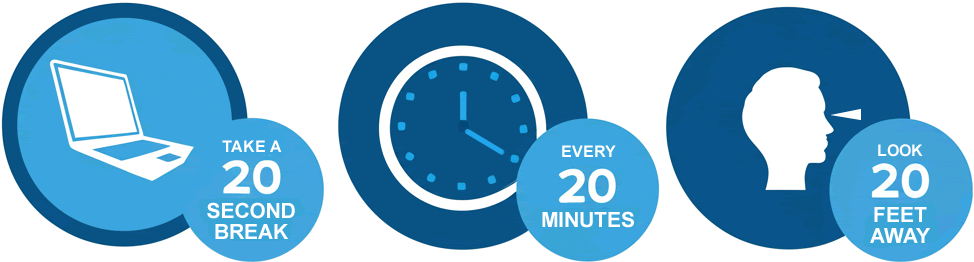
- The Gold Standard Rule: Looking at an object 20 feet away for at least 20 seconds every 20 minutes is the most effective behavioral intervention.
- Blink Rate Drop: When focusing on screens, our blink rate often plummets from 18 blinks per minute to as low as 3.6 blinks per minute.
- Optimal Distance: Your monitor should be positioned 20 to 28 inches away from your face for ideal ocular comfort.
- Heavy User Impact: Recent clinical data suggests that 90% of heavy computer users who spend eight or more hours on screens report regular symptoms.
- Relief Window: Evidence shows that 59% of users report significant symptomatic improvement within four weeks of consistent visual hygiene habits.
Digital eye strain, or computer vision syndrome (CVS), affects over 60% of daily device users. Providing immediate computer vision syndrome relief requires a combination of the 20-20-20 rule for eyes and ergonomic adjustments.
What Happens to Your Eyes: The Science of Digital Fatigue
In my years of focusing on preventive healthcare, I have found that many people treat eye discomfort as a minor annoyance of modern life. However, understanding the biological mechanism of digital eye strain is the first step toward reclaiming your visual health. When we stare at a digital display, our eyes are engaged in a constant, high-intensity workout.
The primary culprit is a phenomenon known as the accommodation reflex. To focus on a near object like a laptop or smartphone, the ciliary muscle within the eye must contract. When you maintain this focus for hours without a break, you develop ciliary muscle fatigue. It is exactly like holding a heavy weight in your hand; eventually, the muscle begins to ache and strain. This is compounded by display flicker frequency. Even if you cannot perceive it, many screens flicker at a rate that forces the brain and eyes to work harder to process a stable image, leading to deeper levels of exhaustion.
Furthermore, our natural lubricating system fails during screen time. A healthy eye blinks about 15 to 22 times per minute to replenish the tear film. However, during intense digital work, we experience a significantly reduced blink rate. Research indicates this can drop to nearly three blinks per minute. This lack of blinking leads to rapid tear film evaporation, leaving the ocular surface exposed and irritated. This cycle of dryness and muscle tension is why so many remote workers end their day with a burning sensation in their eyes.

Identifying Computer Vision Syndrome Symptoms at Home
Recognizing computer eye strain symptoms before they become chronic is vital for preventive care. Most people assume digital eye strain is just about "tired eyes," but the clinical reality is more complex. We generally categorize these issues into three distinct tiers. Understanding which category you fall into can help you determine if your problem is environmental or if you need a professional ophthalmic evaluation.
| Category | Typical Symptoms | Root Cause |
|---|---|---|
| Ocular Surface | Dryness, burning, redness, grittiness | Tear film evaporation and reduced blink rate |
| Accommodative | Blurred vision, double vision, difficulty refocusing | Ciliary muscle fatigue and accommodation reflex stress |
| Extraocular | Neck pain, shoulder stiffness, temple headaches | Poor musculoskeletal posture and improper screen height |
Identifying computer vision syndrome symptoms at home starts with a simple self-check. Do your eyes feel better after a weekend away from screens? Does the blurring disappear after you blink several times? If you find that 90% of your workdays end with a dull ache behind your eyes, you are likely part of the heavy user group experiencing consistent digital fatigue. This is often where musculoskeletal posture comes into play. When our eyes struggle to see clearly, we instinctively lean forward, crane our necks, or hunch our shoulders, leading to tension headaches that originate from the base of the skull.
The 20-20-20 Rule: A Masterclass in Visual Hygiene
If I could recommend only one habit to every person working in a digital environment, it would be learning how to practice the 20-20-20 rule for digital eye strain. This is not just a catchy phrase; it is a clinically validated strategy to reset your visual system.
The rule is simple: Every 20 minutes, look at something 20 feet away for at least 20 seconds. Why 20 feet? In optometry, 20 feet is considered the optical infinity point. When you look at an object at this distance, your ciliary muscles completely relax, and the accommodation reflex is disengaged. It is the visual equivalent of putting down that heavy weight you have been holding.
For preventing digital eye strain for remote workers, the biggest challenge is the adherence gap. We often get into a "flow state" and forget to take breaks. I suggest using a physical timer or a specialized app that dims your screen every 20 minutes. During these 20 seconds, you should also focus on intentional blinking. Since your reduced blink rate is the primary cause of dryness, consciously blinking five to ten times during your break will help restore the tear film. These computer eye strain exercises for long workdays may seem trivial, but they are the foundation of sustainable visual hygiene habits.
Ergonomic Screen Placement and Workspace Optimization
While behavioral changes are crucial, your environment plays a massive role in computer vision syndrome relief. You cannot expect your eyes to stay healthy if they are fighting against glare and poor positioning all day.
Start with ergonomic screen placement for eye strain relief. Your monitor should be roughly an arm's length away, specifically between 20 and 28 inches from your eyes. The height of the monitor is equally important. The center of the screen should be about 15 to 20 degrees below your horizontal eye level. This downward gaze ensures that a greater portion of your eyeball is covered by the eyelid, which significantly reduces tear film evaporation.
Next, focus on optimizing monitor brightness and contrast for eye comfort. Your screen should never be the brightest object in the room. If your monitor looks like a glowing lightbulb in a dark room, your eyes will fatigue rapidly. Ideally, your screen brightness should match the ambient lighting conditions of your workspace. Use workspace illumination that is soft and indirect. Avoid placing your desk directly in front of an unshaded window, as the high contrast between the bright sky and the dark screen creates intense glare. Glare causes ocular surface inflammation over time because it forces the eye to squint and struggle to resolve images.
Professional Triage: When to See an Eye Doctor
Even with the best visual hygiene habits, there are times when self-care isn't enough. If you have followed the 20-20-20 rule for eyes and optimized your workstation but still suffer from daily headaches or persistent blurred vision, it is time for a professional examination.
Digital eye strain can often mask underlying refractive errors. You might have a mild case of astigmatism or presbyopia that your brain has been compensating for, but the demands of digital devices make those compensations impossible to maintain. A comprehensive eye exam can determine if you need specialized computer glasses. These are different from standard reading glasses as they are specifically tuned to the intermediate distance of a computer screen.
Regarding clinical interventions, I often recommend using preservative-free artificial tears. These are much safer for frequent use than standard "redness relief" drops, which can actually cause rebound inflammation. While the debate over blue light glasses continues, many patients find relief not necessarily from the color filtering, but from the slight magnification or the physical barrier they provide against dry office air. However, nothing replaces a healthy workspace and regular breaks.
FAQ
What are the most common symptoms of digital eye strain?
The most frequent symptoms include dry or itchy eyes, blurred vision, and headaches centered around the temples or behind the eyes. Many users also report neck and shoulder pain, which results from poor posture while trying to see the screen more clearly.
How can I prevent eye strain while working on a computer?
Prevention involves a three-pronged approach: practicing the 20-20-20 rule, maintaining proper screen distance of 20 to 28 inches, and ensuring your screen brightness matches your room's lighting to minimize glare.
Can digital eye strain cause permanent damage to your eyes?
Current medical consensus suggests that digital eye strain does not cause permanent organic damage to the eye structure. However, it can lead to chronic discomfort, reduced productivity, and may exacerbate existing conditions like dry eye syndrome if not managed properly.
What is the 20-20-20 rule for reducing eye strain?
It is a practice where you look at an object 20 feet away for 20 seconds every 20 minutes of screen use. This allows the internal muscles of the eye to relax and resets your focus, preventing the buildup of tension.
Do blue light glasses actually help with digital eye strain?
While blue light itself is not the primary cause of strain—the way we use our devices is—some people find these glasses helpful for reducing glare and improving contrast. However, clinical studies suggest they are less effective than behavioral changes like the 20-20-20 rule.
How do I adjust my monitor to reduce eye fatigue?
Place your monitor so that the top of the screen is at or slightly below eye level, ensuring the center is about 15 to 20 degrees below your horizontal line of sight. Also, position the screen to avoid reflections from windows or overhead lights.